How to log back in when Limit Login Attempts locks you out
- Go to Flywheel and select the database
- Find options table
- Search for option_name = limit_login_lockouts
- Delete the record and you’ll be able to log in again


Personal notes
How to log back in when Limit Login Attempts locks you out
Normally the get_the_content() tag returns the content without formatting. I found out a solution to make get_the_content() tag return the same content as the_content().
For me and others that can be a problem if you expect them to behave the same. I looked into the WordPress core and found a solution. Put this code into your functions.php in your theme folder.
function get_the_content_with_formatting ($more_link_text = '(more...)', $stripteaser = 0, $more_file = '') {
	$content = get_the_content($more_link_text, $stripteaser, $more_file);
	$content = apply_filters('the_content', $content);
	$content = str_replace(']]>', ']]>', $content);
	return $content;
}
In your theme, call the function within the loop:
function wpb_new_contactmethods( $contactmethods ) {
// Add Twitter
$contactmethods['twitter'] = 'Twitter';
//add Facebook
$contactmethods['facebook'] = 'Facebook';

return $contactmethods;
}
add_filter('user_contactmethods','wpb_new_contactmethods',10,1);
Find our more tips and tricks – 32 Extremely Useful Tricks for the WordPress Functions File: http://www.wpbeginner.com/wp-tutorials/25-extremely-useful-tricks-for-the-wordpress-functions-file/
Get the page ID with a page template assigned to it
$sql = "select post_id from $wpdb->postmeta where meta_key like '_wp_page_template' and meta_value = 'template-products.php'";
$result = $wpdb->get_results( $sql );
foreach ( $result as $value ) {
    $page_id = $value->post_id;
}
wp_reset_query();
function custom_login_form( $args ) {
	$redirect_url = 'https://christinewilson.ca';
	$defaults = shortcode_atts( array(
		'echo'              => false,
		'redirect'          =>  $redirect_url,
		'form_id'           => 'loginform',
		'label_username'    => 'Username',
		'label_password'    => 'Password',
		'label_remember'    => 'Remember Me',
		'label_log_in'      => 'Log In',
		'id_username'       => 'user_login',
		'id_password'       => 'user_pass',
		'id_remember'       => 'rememberme',
		'id_submit'         => 'wp-submit',
		'remember'          => true,
		'value_username'    => NULL,
		'value_remember'    => false
	), $args );
	$login_args = wp_parse_args( $args, $defaults );
	return wp_login_form( $login_args );
}
add_shortcode( 'login_form', 'custom_login_form' );
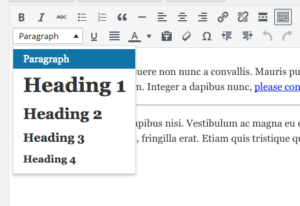
function custom_wp_texteditor_styles ($arr){
    $arr['block_formats'] = 'Paragraph=p;Heading 1=h1;Heading 2=h2;Heading 3=h3;Heading 4=h4;';
    return $arr;
  }
add_filter('tiny_mce_before_init', 'custom_wp_texteditor_styles');
add_action( 'after_setup_theme', 'wpse3882_after_setup_theme' );
function wpse3882_after_setup_theme()
{
    add_editor_style();
}

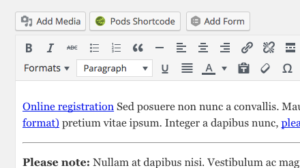
add_filter('mce_buttons_2', 'wpse3882_mce_buttons_2');
function wpse3882_mce_buttons_2($buttons)
{
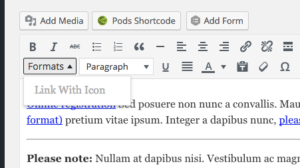
    array_unshift($buttons, 'styleselect');
    return $buttons;
}

add_filter('tiny_mce_before_init', 'wpse3882_tiny_mce_before_init');
function wpse3882_tiny_mce_before_init($settings)
{
    $settings['theme_advanced_blockformats'] = 'p,h2,h3,h4';

    // From http://tinymce.moxiecode.com/examples/example_24.php
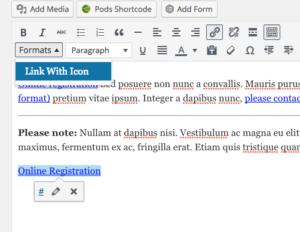
    $style_formats = array(
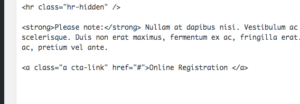
        array('title' => 'Link With Icon', 'selector' => 'a', 'classes' => 'cta-link')
    );
    // Before 3.1 you needed a special trick to send this array to the configuration.
    // See this post history for previous versions.
    $settings['style_formats'] = json_encode( $style_formats );

    return $settings;
}