

$site = 'http://finance.yahoo.com/d/quotes.csv?s=IAC-A.TO&f=snll1c';
$homepage = file_get_contents($site);
$filename = 'wp-content/themes/infor/cache/quotes.csv';
$handle = fopen($filename,"w");
fwrite($handle,$homepage);
echo "Success";
fclose($handle);
Custom Fancybox CSS Style
EXAMPLE
Here is an example implementation of fancy box on the Albany Pump website.
CSS File
body {
  // fancybox skin style
  .fancybox-skin {
  	// -webkit-box-shadow:none;
  	// -moz-box-shadow: none;
  	// box-shadow:none;
  	// background:none;
  }

  // close button
  .fancybox-close {
  	// background: url(../images/IMAGE-NAME.png) no-repeat;
  	// background-size: 20px 20px;
  	// top: -40px;
  }
  .fancybox-close:hover, .fancybox-close:focus {
  }

  // fancybox caption text area
  .fancybox-text {
  }

  // fancybox next control button
  .fancybox-next span {
  }
  .fancybox-next span:hover, .fancybox-next span:focus {
  }

  // fancybox previous control button
  .fancybox-prev span {
  }
  .fancybox-prev span:hover, .fancybox-prev span:focus {
  }

  .fancybox-title.fancybox-title-float-wrap {
  	span {
  	}
  	> .child {
  	// border-radius: 0px;
  	// background-color: rgba(0,112,60,0.85);
  	// white-space: normal;
  	// text-shadow: none;
  	}
  }
}
jQuery Window Resize
    var $window = jQuery(window);

    function checkWidth() {
        var windowsize = $window.width();
        if (windowsize > 1400) {
            jQuery("#first-tab").click(function() {
           	//do something
            });
        } else {
            jQuery("#first-tab").click(function() {
		//do something
            });
        }
    }

    // Execute on load
    checkWidth();

    // Bind event listener
    jQuery(window).bind('resize', checkWidth);
Hide Select Element Arrow – Internet Explorer 10 and up, and other browsers
CSS File
// Internet Explorer 10
select::-ms-expand {
  display:none;
}

// Other Browsers
select {
  -webkit-appearance:none;
  -moz-appearance:none;
  -o-appearance:none;
   appearance:none;
}
Custom Gravity Forms – Columns styling
Custom Class Usage
Checkboxes and Lists Fields
gf_list_2col = 2 columned List
gf_list_3col = 3 columned List
gf_list_4col = 4 columned
gf_list_5col = 5 columned
Two Columns of Text Fields side by side
gf_left_half = The left column
gf_right_half = The right column
Three Columns side by side
gf_left_third = Left column
gf_middle_third = Middle column
gf_right_third = Right column
gf_inline
This places the field inline horizontally with other fields but does not create equally-spaced column layouts. This is useful for different sized fields or when you simply want a horizontal layout without actual column spacing.
—————————————– CODE ———————————–
CSS File
ul.gform_fields {
  // gravity form container
  .gform_wrapper .gform_body {
  	width: auto;
  }

  // labels
  .gfield .gfield_label,
  .ginput_container label {
  }

  // sub labels
  .gform_wrapper .field_sublabel_above .ginput_complex.ginput_container label {
  }

  // gform body
  .gform_wrapper .gform_body {
  	width: auto;
  }

}


// submission errors
  .gfield_error {
  }

// submit button
  .gform_button, input[type="submit"] {
  }

// submit hover, submit focus
  .gform_button:hover, input[type="submit"]:hover, .gform_button:focus, input[type="submit"]:focus {
  }
WordPress Theme Options – Favicon, Header, and Footer
You can use this code to get the wordpress backend theme option selected images.
PHP File
// Favicon
$website_favicon_array = wp_get_attachment_image_src(get_option('theme_options_website_favicon')[0], '');
$website_favicon = $website_favicon_array[0];

// Header Logo
$header_logo_array = wp_get_attachment_image_src(get_option('theme_options_website_logo')[0], '');
$header_logo = $header_logo_array[0];

// Footer Logo
$footer_logo_array = wp_get_attachment_image_src(get_option('theme_options_website_footer_logo')[0], '');
$footer_logo = $footer_logo_array[0];
Fixed Menu On Scroll (with Desktop only Logic) jQuery
	$(window).scroll( function() {
		var scroll_count = 0;
		if ( $(this).scrollTop() > 250 && $(this).width() > 768  ) {
			 $(".nav-menu").addClass("positionfixed");
			 if ( scroll_count < 1 ) {
			 		$(".nav-menu").hide();
					$(".positionfixed").fadeIn();
				}
			 scroll_count = 1;
		 } else {
			 $(".nav-menu").show();
			 $(".nav-menu").removeClass("positionfixed");
			  scroll_count = 0;
		 }

 });
Embed Video Player
Video Class code attached. You can put this file in any directory. Previously it was put in a folder called classes.
Calling video class
$link = "https://www.youtube.com/watch?v=NpEaa2P7qZI";
$embed = Video::get_embed_URL($link)."?&autoplay=1&loop=1";
Video Class
class Video {
const _youtube_regex = '/(\/\/.*?youtube\.[a-z]+)\/watch\?v=([^&]+)&?(.*)/';
const _youtubeshort_regex = '/(\/\/.*?youtu\.be)\/([^\?]+)(.*)/i';
const _vimeo_regex = '/(\/\/.*?)vimeo\.[a-z]+\/([0-9]+).*?/';

/**
 * Given filetype column from DB's article_medias table will return true if the media is video
 * @param string $source source from article_medias.filetype column
 * @return bool True if video
 */
public static function is_video( $source ) {
	if ($source == 'youtube' || $source == 'youtu.be' || $source == 'vimeo') {
		return true;
	} else {
		return false;
	}
}


/**
 * Given a url param to a youtube or vimeo video, will return the related format
 * @param string $url Url to the video
 * @return bool|string
 */
public static function get_source( $url ) {
	if (preg_match(self::_youtube_regex, $url)) {
		$format = 'youtube';
	} else if (preg_match(self::_youtubeshort_regex, $url)) {
		$format = 'youtu.be';
	} else if (preg_match(self::_vimeo_regex, $url)) {
		$format = 'vimeo';
	} else {
		return false;
	}

	return $format;
}


/**
 * Given a video url to either a youtube or vimeo video, will return the specific video id
 * @param string $url Video url
 * @return bool|string
 */
public static function get_source_ID( $url ) {
	$format = self::get_source($url);

	switch ($format) {
		case 'vimeo':
			$vid_id = preg_replace(self::_vimeo_regex, '$2', $url);
			if (substr($vid_id, 0, 5) == "http:") { $vid_id = substr($vid_id, 5); }
			if (substr($vid_id, 0, 6) == "https:") { $vid_id = substr($vid_id, 6); }
			break;

		case 'youtube':
			$vid_id = rtrim(preg_replace(self::_youtube_regex, '$2', $url), '?');
			if (substr($vid_id, 0, 5) == "http:") { $vid_id = substr($vid_id, 5); }
			if (substr($vid_id, 0, 6) == "https:") { $vid_id = substr($vid_id, 6); }
			break;

		case 'youtu.be':
			$vid_id = rtrim(preg_replace(self::_youtubeshort_regex, '$2', $url), '?');
			if (substr($vid_id, 0, 5) == "http:") { $vid_id = substr($vid_id, 5); }
			if (substr($vid_id, 0, 6) == "https:") { $vid_id = substr($vid_id, 6); }
			break;

		default:
			return false;
	}
	return $vid_id;
}


 /**
	* Gets the html url for the video
	* @param string $id Video id
	* @param string $format Video format/source
	* @return bool|string returns url for embedding the video
	*/
public static function get_embed_URL($url) {
	$format = self::get_source($url);
	$id = self::get_source_ID($url);

 switch ($format) {
	 case 'vimeo':
		 $link = 'https://player.vimeo.com/video/'.$id;
		 break;

	 case 'youtube':
		 $link = 'https://www.youtube.com/embed/'.$id;
		 break;

	 case 'youtu.be':
		 $link = 'https://www.youtube.com/embed/'.$id;
		 break;

	 default:
		 return false;
 }

 return $link;
}

}
Specific Tiny MCE Standard Styles
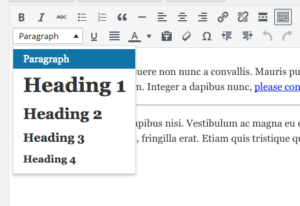
function custom_wp_texteditor_styles ($arr){
    $arr['block_formats'] = 'Paragraph=p;Heading 1=h1;Heading 2=h2;Heading 3=h3;Heading 4=h4;';
    return $arr;
  }
add_filter('tiny_mce_before_init', 'custom_wp_texteditor_styles');
Custom Tiny MCE Buttons
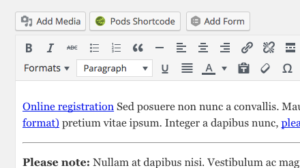
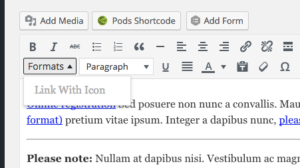
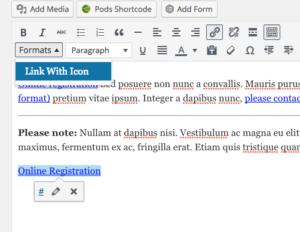
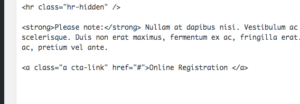
add_action( 'after_setup_theme', 'wpse3882_after_setup_theme' );
function wpse3882_after_setup_theme()
{
    add_editor_style();
}

add_filter('mce_buttons_2', 'wpse3882_mce_buttons_2');
function wpse3882_mce_buttons_2($buttons)
{
    array_unshift($buttons, 'styleselect');
    return $buttons;
}

add_filter('tiny_mce_before_init', 'wpse3882_tiny_mce_before_init');
function wpse3882_tiny_mce_before_init($settings)
{
    $settings['theme_advanced_blockformats'] = 'p,h2,h3,h4';

    // From http://tinymce.moxiecode.com/examples/example_24.php
    $style_formats = array(
        array('title' => 'Link With Icon', 'selector' => 'a', 'classes' => 'cta-link')
    );
    // Before 3.1 you needed a special trick to send this array to the configuration.
    // See this post history for previous versions.
    $settings['style_formats'] = json_encode( $style_formats );

    return $settings;
}